How to register on websites.co.in through web platform
Print
Created by: Shraddha K
Modified on: Fri, 8 Nov, 2024 at 5:32 PM
Registration Through Gmail

- Enter your name, email id, phone number & set a password.
- After filling in all details click on Register.

- After signing up, a verification code will be send to your registered email id. Enter the code & click Verify.
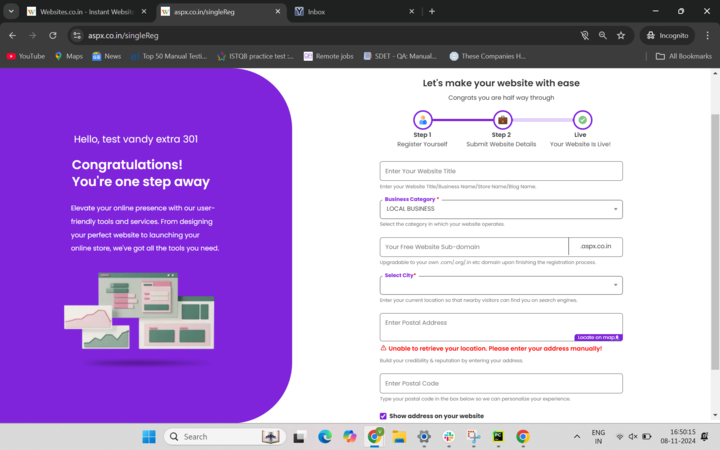
- Time to setup your website by entering appropriate website title, category, domain, location, your business address and pincode. Click on Create Website after filling in the details.
Registration Through Facebook
- You can even register on websites.co.in if you have an existing Facebook account. To create a website with Facebook, click on the Facebook button.
- Enter your Facebook credentials & click on Log In.

- Click on the ‘Continue as (your name)’ button to begin with the creation of your website. The page after this will lead you directly to the form where you enter your business details. Enter your relevant business information.
Registration Through Google
- Visit www.websites.co.in and click on Login.
- To create a website through Google, click on Sign up with google the Google button on the registration page.
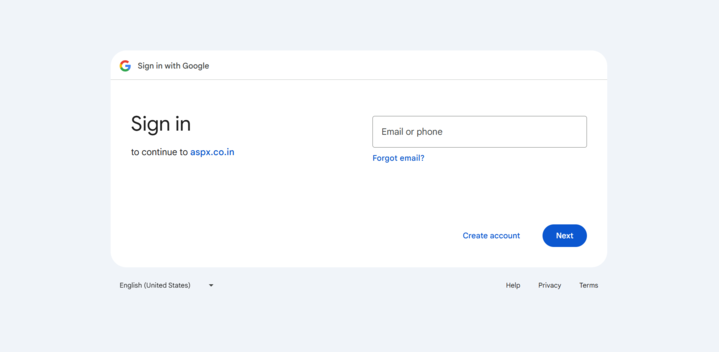
- It will lead you to a page where you need to log in to the existing Google account of your choice. By logging in to your account, you authorize websites.co.in to create a website through that account.
- It will directly lead you to the form where you enter your business details. Enter your relevant business information.
Shraddha is the author of this solution article.
Did you find it helpful?
Yes
No
Send feedback Sorry we couldn't be helpful. Help us improve this article with your feedback.
